
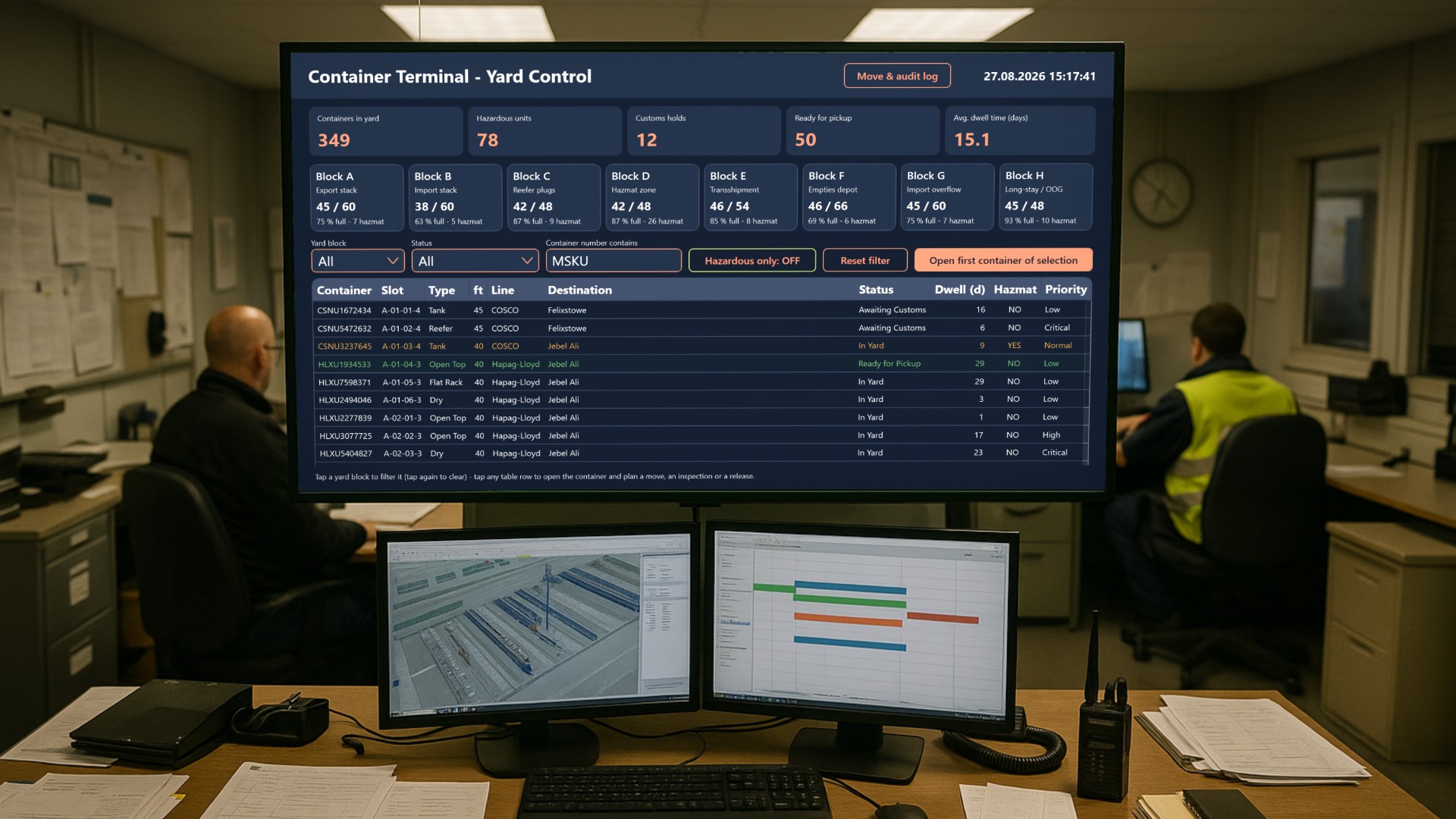
A container terminal lives and dies by how well it knows where every box is standing, how long it has been standing there, and what is blocking it from leaving. In this article we look at an application that is built as the working surface for exactly that job: the yard planner who has to answer those three questions all shift long, on a touch display, without a keyboard in reach.
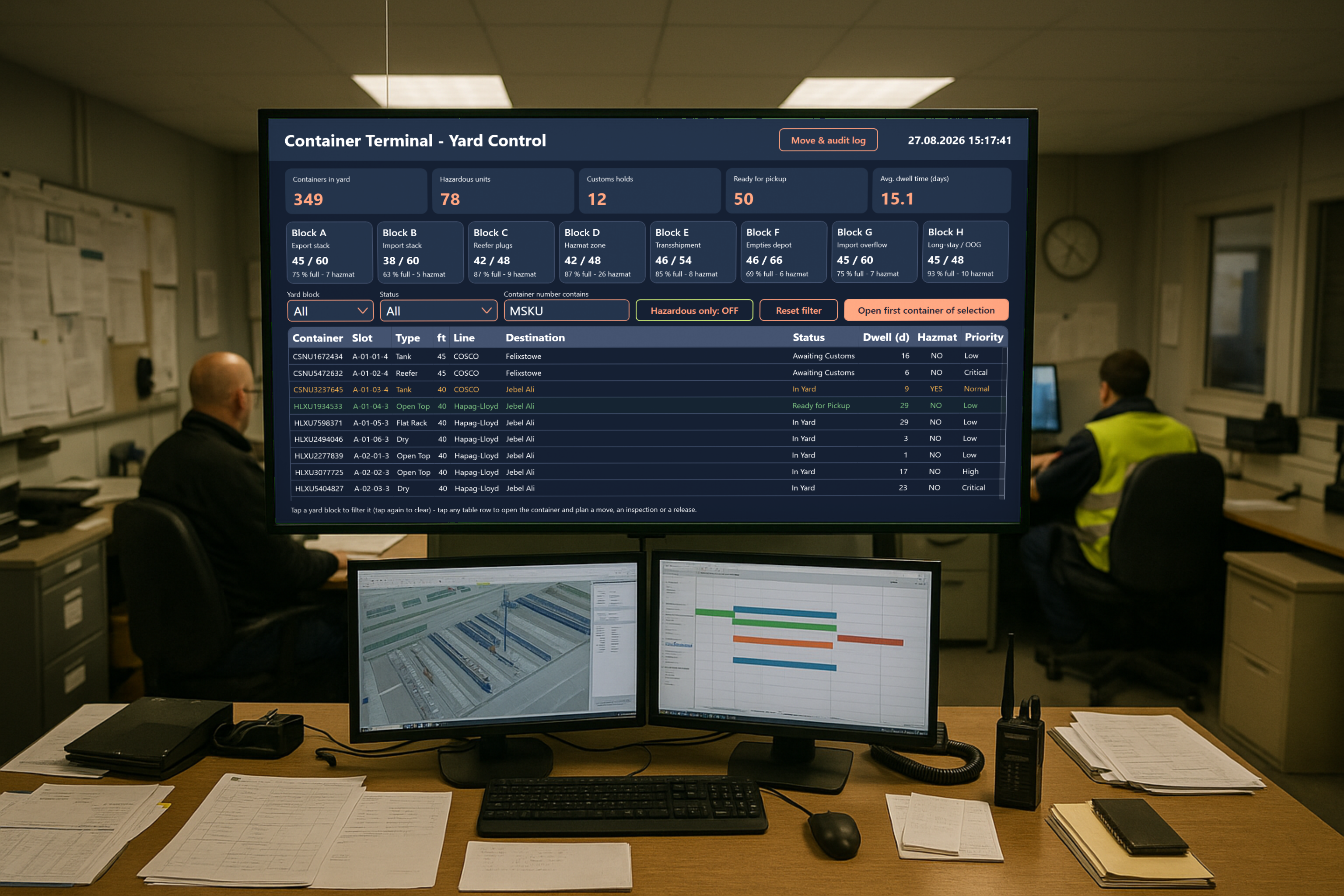
The whole yard on one screen
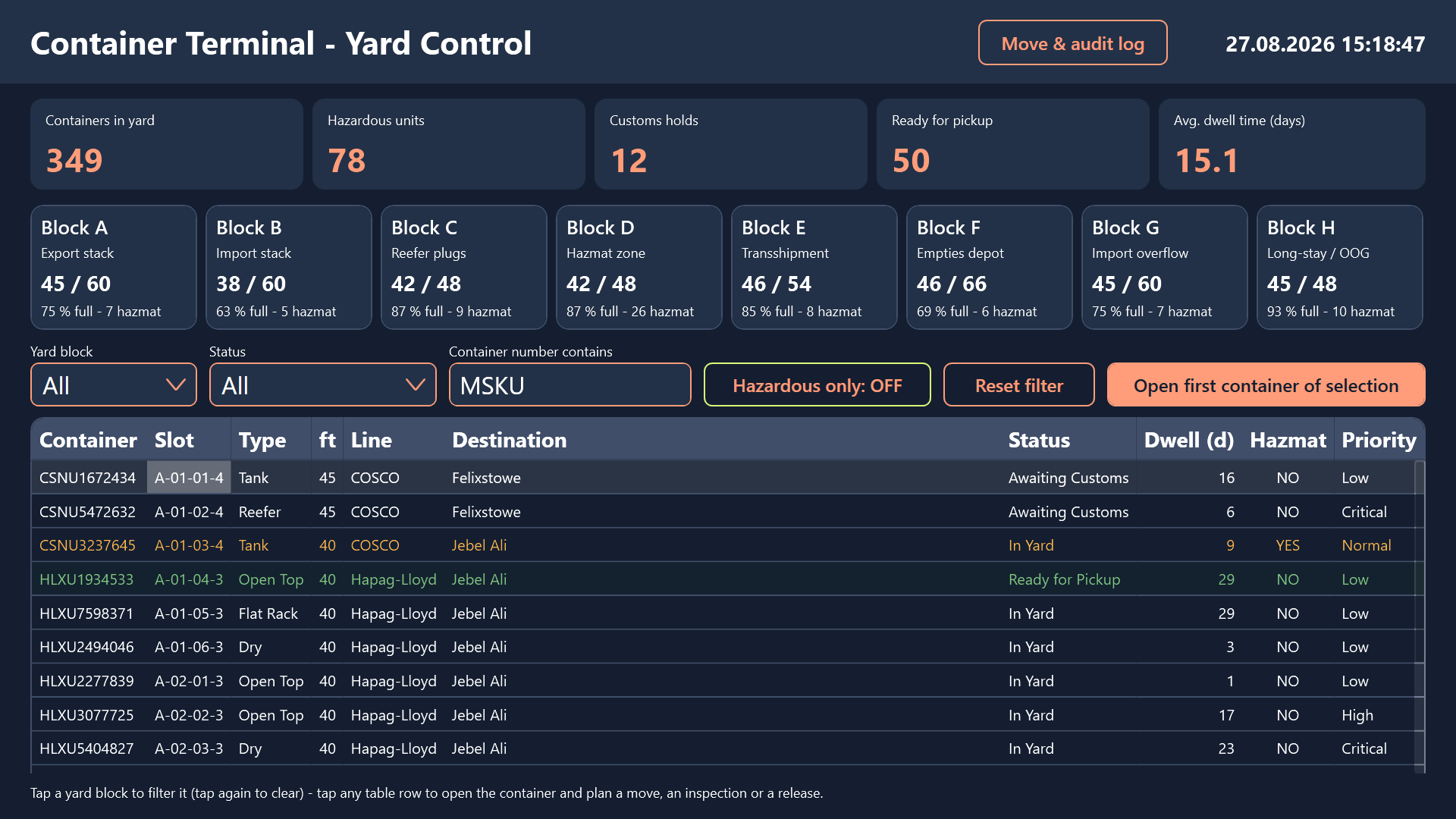
The top of the dashboard is a KPI strip that answers the “how are we doing right now” question before anyone starts filtering anything. It shows how many containers are currently on the ground, how many of them are hazardous units that need special handling and equipment, how many are sitting under a customs hold, how many are cleared and waiting for a trucker to collect them, and what the average dwell time across the yard looks like.
Dwell time is the number that quietly costs money. Every extra day a box occupies a slot is a slot that cannot be sold to the next vessel call. Worse, long-stay units are the ones that get buried under three tiers of newer arrivals and then need three unproductive moves to dig out. Having that average on the wall all day changes how a planner treats the bottom of the stack.
Eight blocks, eight cards
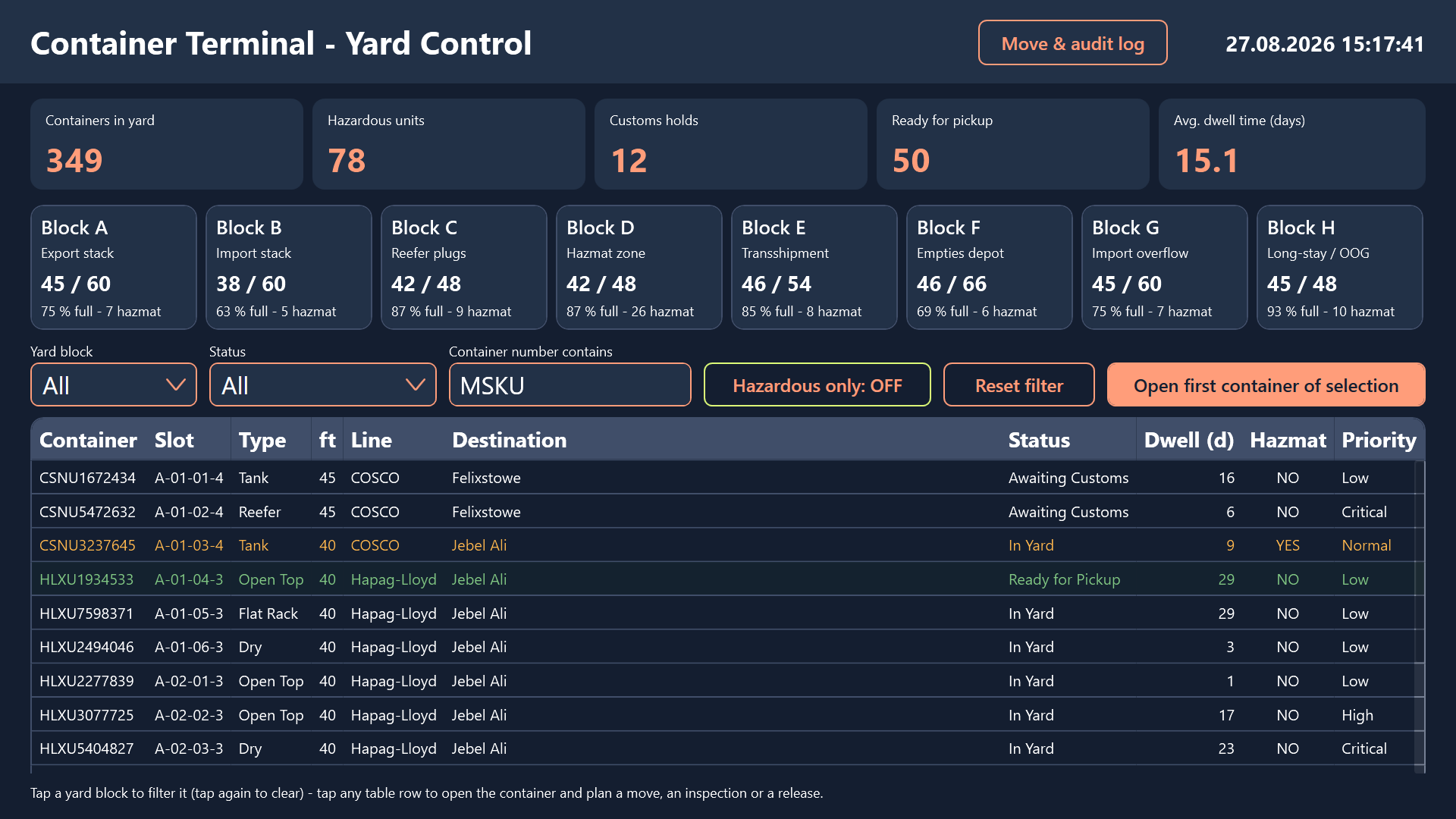
Below the KPIs, the eight yard blocks of the terminal are shown as cards: the export stack, the import stack, the reefer plugs with their power sockets, the hazmat zone, the transshipment area, the empties depot, an import overflow block, and the long-stay / out-of-gauge block.
Each card carries what the block is for, how many of its slots are taken against its nominal capacity, and how full it is in percentage terms. That is enough for a planner to see instantly that the reefer block is nearly saturated while the empties depot still has room, and to route the next discharge accordingly - which is a decision that otherwise takes a phone call and a walk to the window.
The container table is where the work happens
The main working area is a filterable container table covering several hundred boxes. The planner narrows it down by block, by status, by a container number fragment typed into the search box, or by flipping on a hazardous only toggle, and then works through whatever is left.
Rows are colour-coded so problems register before anything is actually read:
- Blocked units are tinted red
- Released units are green
- Hazardous units are amber, regardless of their status
That last rule matters: a hazmat box stays visually flagged even when everything about it is fine, because the equipment decision downstream depends on it.
Opening a container
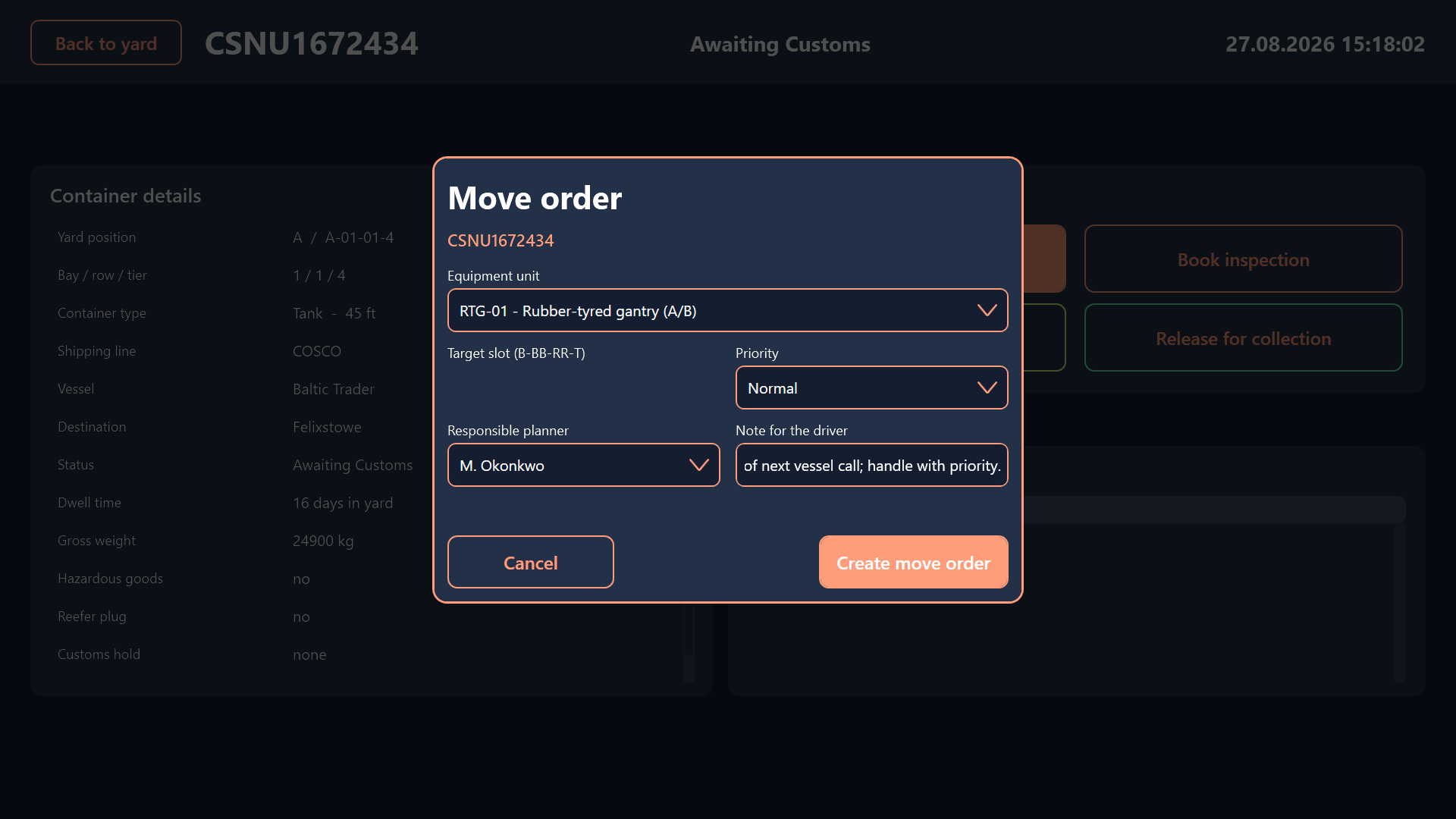
Tapping any row opens that container. The planner sees the full record: the stowage position down to bay, row and tier, container type and size, shipping line, vessel, destination, gross weight, dwell days, hazard class, reefer flag, current customs reference and priority. Underneath sits the complete history of everything that has ever been done to this box.
From the detail view, three dialogs and one direct action are available.
Move order
Reassign the container to a different slot and pick which piece of equipment does the lift - rubber-tyred gantries, reach stackers including the hazmat-certified one, the empty handler, the straddle carrier, or a terminal tractor. The planner sets a priority, names the responsible planner, and adds a note that the driver will see.
The target slot is validated against the terminal’s slot syntax, so a typo never reaches the operation. A driver sent to a bay that does not exist is a wasted move plus a radio call plus a re-plan, and this is the cheapest possible place to catch it.
Inspection booking
Schedule a seal check, a full physical exam, a reefer temperature audit, a hazmat placard check, a VGM weight verification or a scanner run into one of the day’s time windows, with a named inspector attached.
Customs hold
Place a container under hold. This dialog deliberately refuses to proceed without a properly formatted customs reference number, because a hold without a reference is unusable to everybody downstream: nobody can look it up, chase it, or clear it. Making the field mandatory at the point of entry is what keeps the hold list actionable a week later.
Release for collection
The fourth action needs no dialog at all. One tap clears the box for pickup.
An audit trail nobody has to maintain
Everything a planner does lands in an append-only audit trail. A separate log screen collects the open move orders, all customs holds, all booked inspections and the full audit history in one place.
This is the screen a supervisor opens when a box did not make its truck slot, and the screen a customs officer opens when they want to know who touched a held container and when. Because it is a by-product of the normal working flow rather than a separate reporting duty, it is actually complete - which is more than can be said for most whiteboard-and-spreadsheet yards.
Built for the way the yard office actually works
The screen belongs in the terminal’s yard planning office on a large wall-mounted or desk touch display, and it works equally well on a shift supervisor’s touch terminal.
The detail that ties it together is the global key handler. A handheld barcode or RFID scanner can be pointed straight at a container placard: if the scanned value is an exact match, the application jumps directly into that container’s detail view. Anything else drops into the yard search box as a filter. No keyboard, no mouse, no hunting through eight blocks for a number somebody read out over the radio.
Result
What starts as three questions - where is the box, how long has it been there, what is blocking it - ends up as a single touch surface that answers all three and lets the planner act on the answer in the same breath. Block occupancy is visible before the shift starts, problem containers colour themselves in, and every move order, inspection and hold is captured with the context that the next person down the line needs.
The sample project ships with several hundred containers spread across all eight blocks, so you can filter, open, move, hold and release your way through a realistic yard right away.