
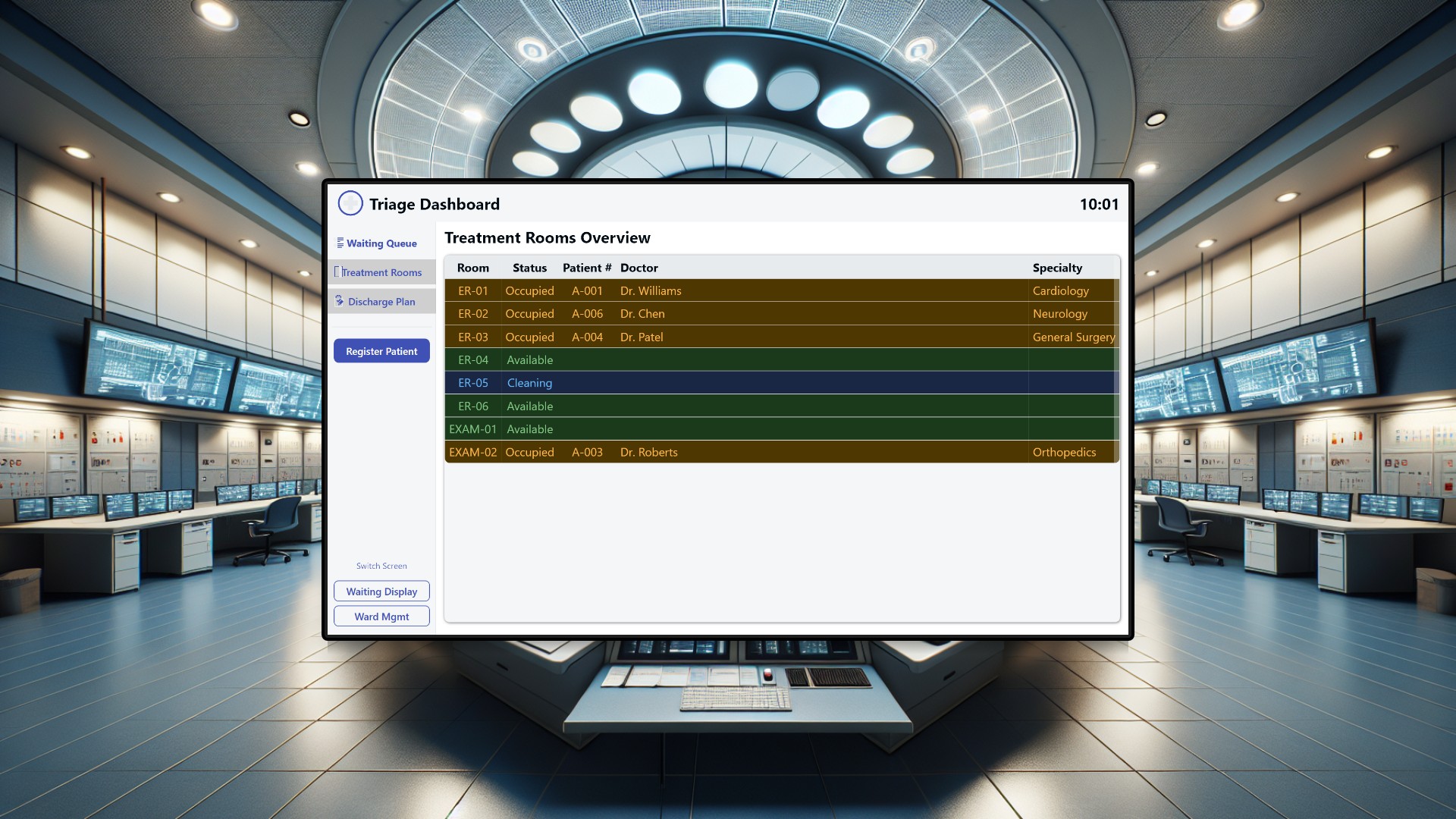
Emergency departments run on controlled chaos. Nurses at the triage desk register patients while simultaneously fielding questions from the waiting room. Doctors need to know which treatment rooms are free. Ward staff juggle bed availability, patient transfers, and room cleaning schedules. And through it all, patients sit in the waiting area with no idea when they will be seen, asking the front desk “how much longer?” every few minutes. This project replaces the phone calls, whiteboards, and shouted hallway updates with three purpose-built dashboards that give every stakeholder exactly the information they need, when they need it. All three screens share the same data through Peakboard Hub lists, so a patient registered at triage instantly appears on the waiting room display and becomes visible to the ward team.
The problem with hospital coordination today
In most emergency departments, coordination is a patchwork of analog tools. A whiteboard tracks which treatment rooms are occupied. A phone call tells the ward that a patient is ready for transfer. A nurse walks to the waiting room to call out a name. Discharge planning lives in someone’s head or on a sticky note. None of these systems talk to each other, and none of them update in real time. The result is predictable: rooms sit empty because nobody knows they have been cleaned, patients wait longer than necessary because the queue is invisible, and discharge bottlenecks cascade into bed shortages that ripple through the entire hospital.
The triage nurse station
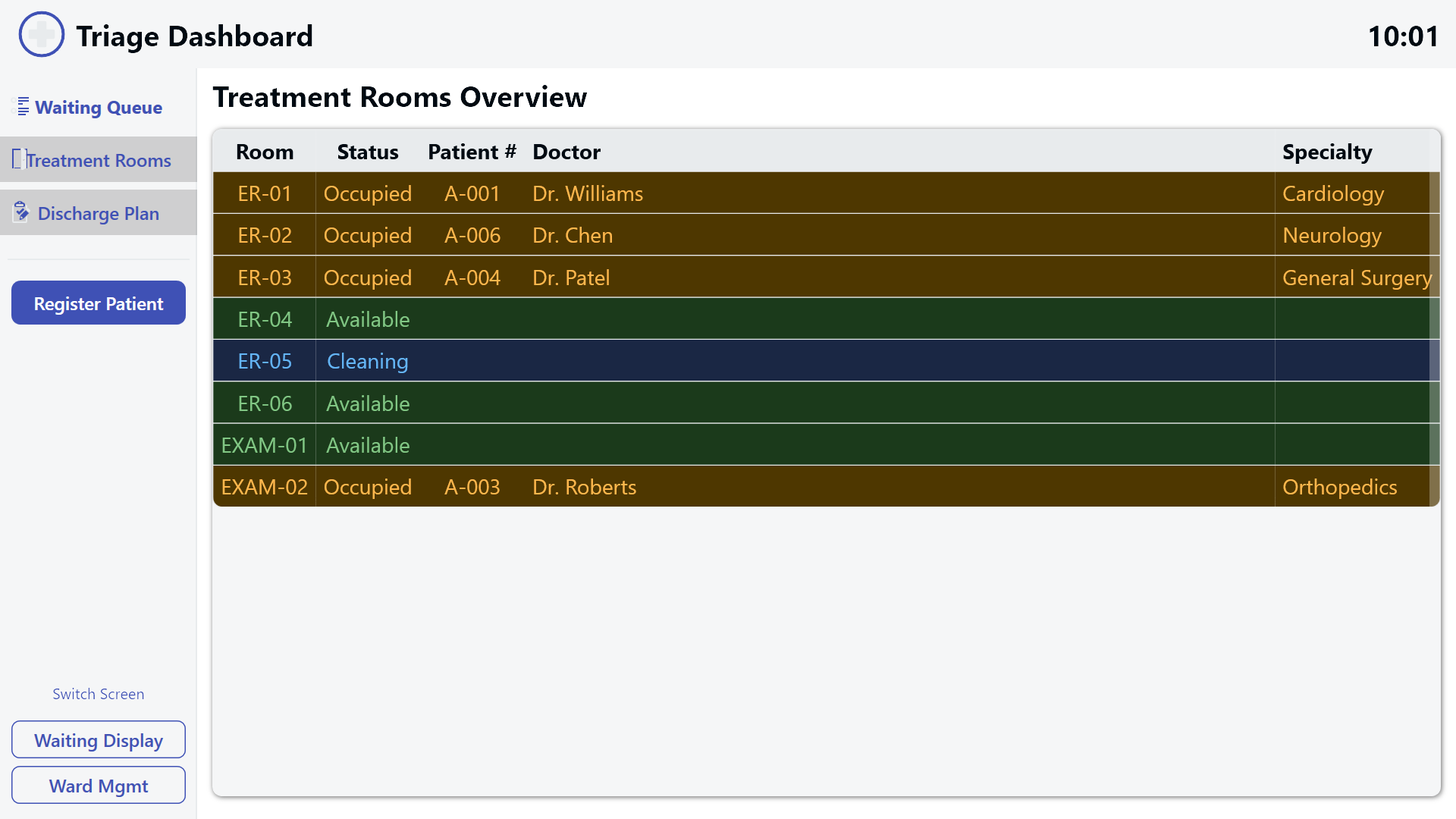
The triage nurse station is the command center of the system, running on a touchscreen monitor at the emergency department reception desk. When a patient arrives, the nurse opens a registration dialog that captures everything needed for triage in a single form: symptoms, vital signs, a pain level slider from 0 to 10, medical history flags for conditions like hypertension, diabetes, cardiac issues, and allergies, plus insurance provider and whether the patient arrived by ambulance. Most importantly, the nurse assigns a triage priority - Critical, Urgent, Standard, or Non-Urgent - which determines the patient’s position in the queue and how they appear across all three dashboards.
The main view organizes information into three tabs. The waiting queue tab shows all registered patients in a color-coded table where red rows indicate critical cases, amber marks urgent patients, and green represents standard priority. The treatment rooms tab provides a live overview of room occupancy so the nurse can immediately see which rooms are available when a patient needs to be moved from the waiting area. The discharge planning tab tracks patients who are nearing release, helping the nurse anticipate when beds and rooms will free up. This screen stays on throughout the shift, giving the reception nurse a continuous, up-to-date picture of the entire department.
The waiting area display
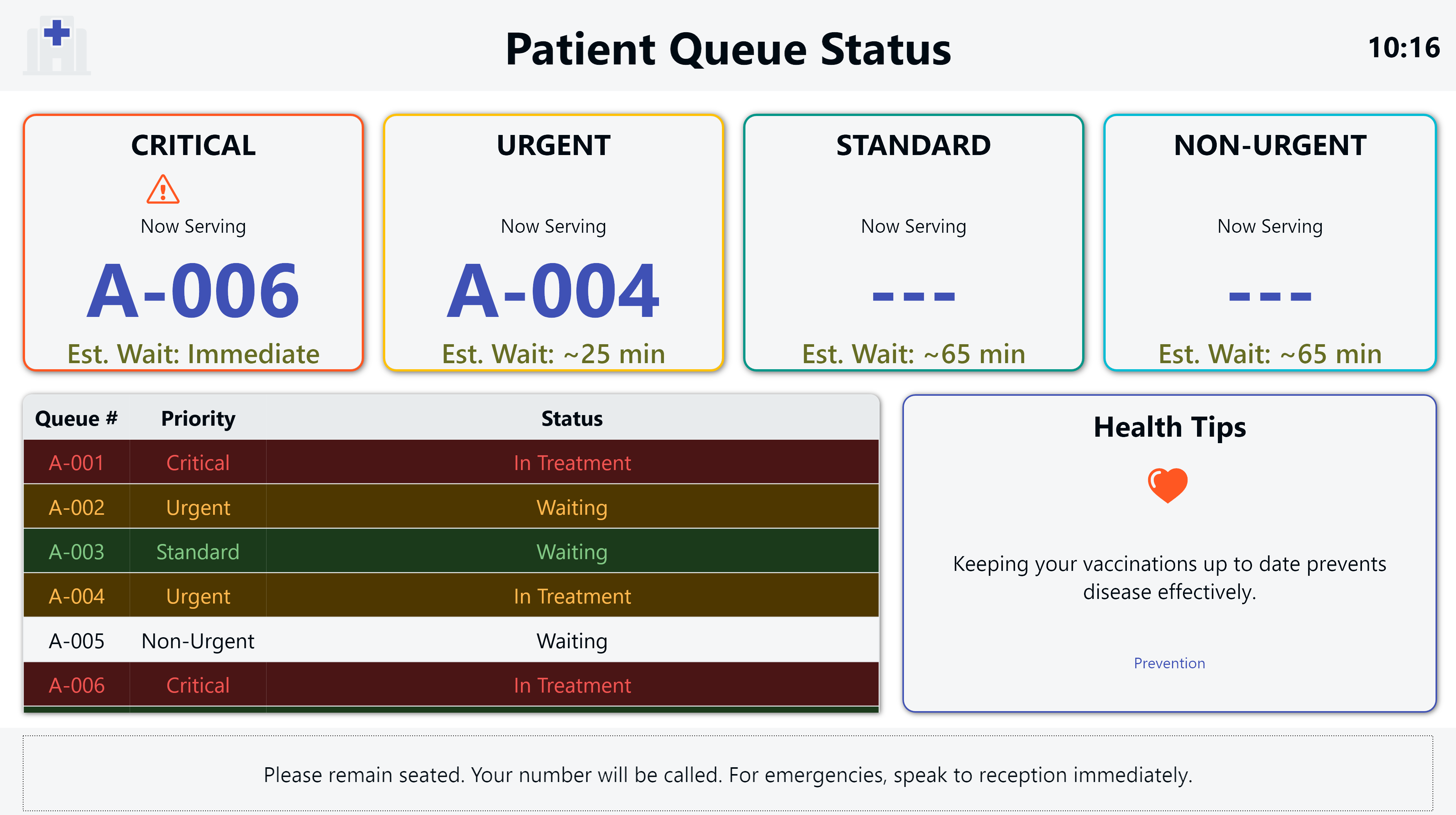
The waiting area display hangs on a large screen in the public waiting room and serves one critical purpose: reducing patient anxiety. At the top, four priority cards show the queue number currently being served in each triage category along with estimated wait times that refresh every 15 seconds. Patients can see at a glance where things stand without having to approach the desk.
Below the priority cards, a simplified queue table lists anonymized queue numbers with their priority level and current status. No names, no medical details, no personal information - just enough for patients to track their position. A rotating health tips panel cycles through general wellness advice every 30 seconds, giving patients something useful to read during their wait. A footer banner reminds everyone to remain seated and to speak to reception staff in case of emergencies.
This screen is entirely passive. No touch interaction, no buttons, no input. It simply shows information, and in doing so, it dramatically cuts down on the number of times patients interrupt the triage nurse to ask about their wait time.
The ward management dashboard
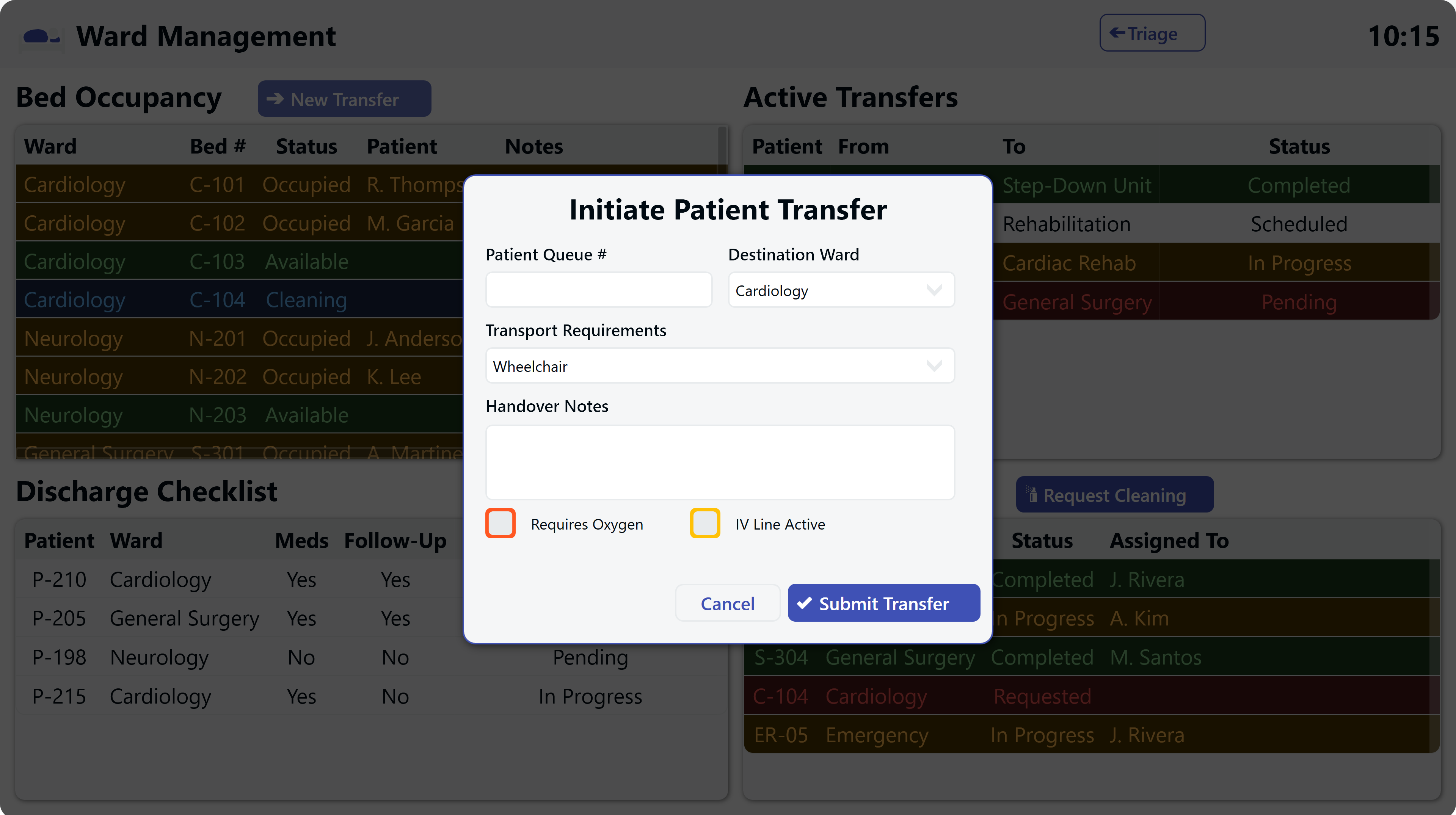
The ward management dashboard sits on a touchscreen at the nursing station and serves charge nurses and ward coordinators. Its four-quadrant layout covers the full scope of ward operations.
The bed occupancy panel tracks every bed across all wards with color-coded status indicators: occupied beds, available beds, beds in rooms currently being cleaned, and reserved beds. At a glance, the ward coordinator knows exactly where capacity exists.
The active transfers panel shows patients currently moving between wards, including where they are coming from, where they are going, and the current progress of the transfer. When a new transfer is needed, a modal dialog lets the coordinator select the destination ward, specify transport requirements like wheelchair or stretcher with oxygen, and add handover notes for the receiving team.
The discharge checklist panel lists patients approaching discharge. Tapping a patient opens a step-by-step confirmation dialog that walks through every required action: medications reviewed, discharge summary completed, follow-up appointment scheduled, patient education delivered, and insurance clearance confirmed. Nothing gets missed, and the ward team can see exactly which steps remain for each patient.
The room cleaning panel coordinates the turnover process. When a patient is discharged, staff can request cleaning for the room. The cleaning team updates the status to in-progress when they start and marks it complete when the room is ready. This closes the loop that so often causes delays - the ward knows the moment a room is available again, without a single phone call.
How the three dashboards work together
The power of this system is not in any single screen but in the way all three share the same underlying data. When a nurse registers a patient at triage, the waiting area display updates within seconds. When a patient is moved to a treatment room, the waiting queue reflects the change and the ward dashboard shows the room as occupied. When discharge is completed and the room is cleaned, bed availability updates across the system instantly.
This shared visibility eliminates the information gaps that cause delays. The triage nurse no longer calls the ward to ask about bed availability. The ward coordinator no longer walks to the emergency department to check on incoming patients. And patients no longer sit in the dark wondering if they have been forgotten.
Result and conclusion
This three-dashboard system transforms hospital coordination from a fragmented, manual process into a connected, real-time operation. The triage nurse has a complete command center for patient registration and department oversight. Patients in the waiting area get the transparency they need to wait with less anxiety. And the ward team has a unified tool for managing beds, transfers, discharges, and room turnovers without phone calls or guesswork. Every stakeholder sees what they need, and every update flows automatically to everyone who needs to know. The invisible becomes visible, and the hospital runs smoother because of it.